
-
Does my account automatically renew?
Only if you want it to.
When you sign up or renew, you can select whether or not you'd like to enable automatic renewal. You can also visit your account settings page to turn automatic renewal on or off.
If you have automatic renewal turned on, we will send an e-mail approximately 5 days before your account renews.
If you have automatic renewal turned off, we will send a renewal reminder approximately 30 and 7 days before your account expires. We also send a renewal reminder on the day of expiration.
-
I didn't receive an email to confirm my order
When you sign up, you should receive an e-mail. If you do not receive this, it may be blocked by your spam filter. Please contact us if you need a receipt and we'll be glad to send you one.
-
My credit card was declined. Why?
When you see a message saying your credit card was declined, you were not charged for the order. Our payment processor does not tell us the reason for the decline. You will have to check with your bank. We encourage you to try again with a different card.
-
I was charged and my account doesn't work. What do I do?
This is rare, but it has happened a few times. If you are charged and you cannot log in, please contact us right away. We can manually activate your account. Please include your full name and user name in the email.
-
I e-mailed you and I haven't heard back.
We try to answer all emails within 24-48 hours (often we're able to answer them within an hour or so). Please give us a little extra time on weekends and holidays.
If you haven't heard back from us, please check your spam folder. Also, check to be sure we're not being blocked by a firewall.
We are committed to satisfying our customers and we always try our best to make sure questions are answered quickly. -
Do you have a phone number?
Yes, but please call only for billing help, log in help, membership questions, cancellations, refunds, or site license help. Our phone staff is not trained to help with technical, computer-related issues.
Our phone number is 716-264-6000. For help problems viewing pdfs, or other computer-related issues, please e-mail. If you include your phone number, we can have someone call you back if you'd like.
-
I lost my password. Can you help?
No problem. To have your password emailed to you, please click here.
-
I can't log in with my username and password
There are a few reasons this might happen.
- Incorrectly typing the username or password is the most common problem people have. Check to be sure your username and password are spelled correctly. Passwords are case-sensitive, so please be sure your caps lock key is off.
- Perhaps your account expired? Your account is valid for 365 days from your signup date.
- Still having trouble? Contact us and we'll be happy to help.
-
How long does a membership last?
A membership lasts for 365 days, beginning on the date that the account was activated.
-
Can I login from school and home?
Yes. If you're a member, you can sign into the site from any computer that's connected to the internet, whether you're at home or at school.
-
I have an individual membership. Can I share my password with others?
No! Members can print materials for their own personal, homeschool, or classroom use only. Sharing of login and password information is strictly prohibited. We do track IP addresses of member logins. If we have reasonable evidence that an account is being shared, your account can be suspended.
-
I am part of a school with a building membership. Who can use this account?
Anyone who works in the building can use the account. Teachers, support staff, and administrators all have full-access to the site from home or school computers.
-
What is your refund policy?
If you are unhappy with your service for any reason, please let us know within 30 days and we will give you a full refund. Contact our Customer Support Desk.
-
How do I become a member?
It's easy! Just go to our Membership Page and sign up!
-
How do I change my e-mail address, password, or other account information?
Just go to your Account Settings Page.
-
How do I contact you?
Send us an e-mail from the Contact Page. Please include your name, username, and a detailed description of what you need help with.
Our mailing address:
6 Main Street
Tonawanda, NY 14150
Our phone number is 716-264-6000
Our fax number is 716-260-2516 -
What if I don't receive a response to my e-mail?
We make a point to answer each e-mail within 48 hours. (You'll usually hear from us much sooner than that.) Please give us a little extra time on weekends and holidays.
If you haven't heard back from us, check your computer's spam folder. Our e-mail may have been lost in there.
Some schools have strict e-mail filters that block our e-mail replies. Please ask your school's IT administrator to include superteacherworksheets.com on their white list to ensure that you'll be able to receive our message.
-
What do I need to view the PDF files?
Most of the worksheets on our site are in PDF format. To view them, you'll need Adobe Reader. Most computers already have this installed. If your computer doesn't have Adobe Reader, you can download it for free from this link: Adobe Reader
-
I see a "Preview" graphic over the worksheet.
If you're seeing a "preview" graphic it means you're not logged in. (Sometimes the site automatically logs you out if your computer has been idle.)
First, be sure you entered your name and password. If the preview button still appears, go to your browser's "options" or "settings" menu and clear the cache. The preview button should disappear. -
I can't view the files on my computer! I'm just getting a blank page or an error.
If you're logged in and can't download of view files from our website, there are three likely problems:
- Most likely, there is a problem with your version of Adobe Reader. Please be sure you have the latest version installed.
- If you're positive you have the most recent version of Adobe Reader, then try to view or download the files with a different browser. (For example, if you're using Firefox, switch to Internet Explorer.)
- If it's still not working, try shutting down the computer and restarting it from scratch. I know it sounds very basic, but it often works.
- You might also want to try it from a different computer, especially if you're on a networked system. Sometimes computer network IT administrators block certain sites or certain types of files.
-
The PDF looks fine on my screen, but when I print the file I see strange characters.
This is a problem for some users who are using the Firefox browser. (Firefox has it's own built-in PDF reader, and it doesn't always allow PDF files to print properly.)
The easiest solution is to use a different browser, such as Internet Explorer, Chrome, or Safari, when viewing PDF files.
In order to print the PDF file properly in Firefox, you'll need to change the default viewer. To do this, follow these steps:- Choose the "tools" pull-down menu.
- Select "options."
- When the window appears, select the "applications" tab.
- Scroll down to "Portable Document Format (PDF)."
- Change "Preview in Firefox" to "Use Adobe Acrobat.
-
When I print a PDF, landscape orientation changes to portrait. Or, a regular worksheet shrinks down to half-size.
These are also known problems with Firefox's built-in PDF viewer.
We recommend using a different browser, however you can change Firefox's default PDF viewer by following these steps:- Choose the "tools" pull-down menu.
- Select "options."
- When the window appears, select the "applications" tab.
- Scroll down to "Portable Document Format (PDF)."
- Change "Preview in Firefox" to "Use Adobe Acrobat.
-
When I print a PDF, dotted lines seem to be missing.
This is a documented bug that exists with Chrome's built-in PDF viewer.
We recommend using a different browser, such as Internet Explorer, Edge, or Mozilla Firefox if possible. The developers of Google's Chrome browser are aware of the issue and are researching a solution.
If you are not able to view and print the desired files using an alternate web browser, you can always save the PDF files to your computer and then open and print them using Adobe:- Bring up the desired PDF worksheet with Chrome.
- Click the "disk" icon located in the lower right corner to save the file.
- (Or right click on the document and choose "save as".)
- Check the filename and save the item to your computer/desktop.
- Locate the file on your computer and open it. It should open with Adobe Reader - which will print the dotted lines correctly as displayed on screen.
-
What can the worksheets be used for?
The printable materials on this site can be used for general classroom instruction, homeschooling, tutoring, church instruction, and for other educational purposes.
-
Can I upload worksheets to my own website?
Sorry, but no. We invite you to link to our website, but unfortunately we cannot allow people to upload our files directly to other sites.
-
Can my school use the worksheets for testing purposes?
Our printable materials can be used for tests that are created to be used within a single school or district, so long as the school or district has a subscription to our site. We request that you keep the name of our website visible on the page.
Please contact us if you'd like to use our materials for tests that will be distributed to several districts, testing companies, or other testing purposes. We usually charge a fee for large print runs. -
Can I publish your content in a book?
We usually charge a small fee for reprinting our content in books. The price would depend on the type of passage and the print run. Please contact us for more information.
-
My school requires permission to reproduce copyrighted material. How do I request permission?
I have received a few e-mails from people at schools with strange policies requiring permission to reproduce our worksheets. If your school requires this, please print our terms of service page and submit it to the necessary administrator. If you need permission in the form of a personal letter or e-mail, please feel free to contact us.
-
How to Print a Super Teacher Worksheets PDF from an iPad?
Did you know that you can print our PDF files from your iPad or other Apple mobile device? You can! Here is a helpful guide for printing PDF files from an iPad. We hope this simple instructional guide will be useful to you as you take advantage of all the great printable resources Super Teacher Worksheets has to offer.
To print a PDF file from the Super Teacher Worksheets website using your iPad:
1. Open the PDF file you would like to print.
2. Locate the share icon on the top right corner of your screen, and click it to access the print icon.
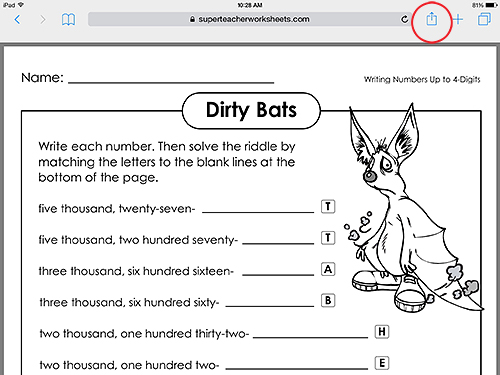
3. A small box with several share options (including Message, Mail, Twitter, and Facebook) will appear. At the bottom of the box, you will need to swipe your finger across the gray icons until you see the Print icon.
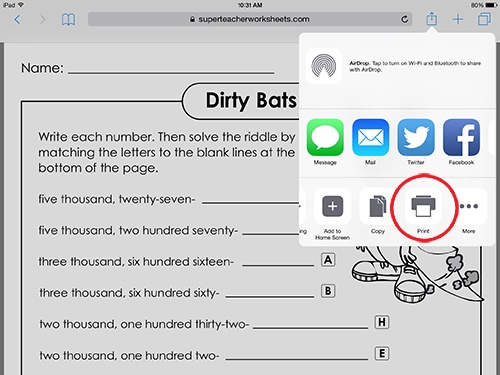
4. Click the Print icon. This will bring you to a page in the small box called Printer Options. Here you will see a list of printers that your iPad is able to print from. This will depend on whether the printer(s) and your iPad are on the same wireless network. (Note: You can only print from a wireless printer with an iPad!)
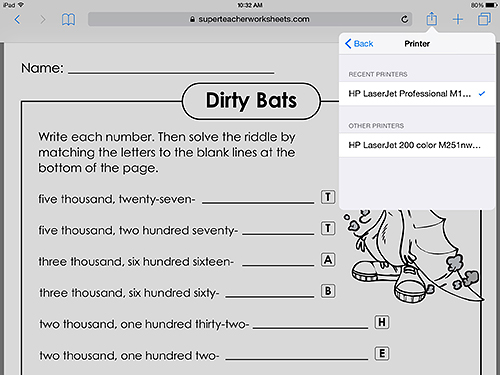
5. If you do not see any printers listed in the Printer Options box, you must make sure the printer you would like to use is compatible with your iPad. If the printer is wireless, you can use the following link from the Apple support team to identify your printer on the list of compatible printers here.
6. If your printer is not on the list of compatible wireless printers, then you will not be able to print from it using your iPad. (If this is the case, you can always save the file to your filing cabinet to print from your desktop later!) However, if your printer is compatible with an iPad, make sure they are both connected properly to the wireless network you are using. Also, make sure they are within wireless range. If you still have trouble, you can refer to the above link for other helpful suggestions.
The Super Teacher Worksheets staff knows our customers are busy, fast-paced, and on-the-go educators. That's why we want to assist you however we can in accessing our printable resources with your mobile Apple device. We admire you for using the latest technology - keep up the great work, Super Teachers!
-
Can I renew by mail?
Yes. Please print and mail the individual renewal order form or the school site license renewal order form. It can be sent to our office at 6 Main Street, Tonawanda, NY 14150.
-
I received an e-mail saying that my account needs to be renewed, but I'm sure my account is not due for renewal.
There may be more than one account in your name. If this is the case, please e-mail us and we'll get it straightened out for you.
-
My subscription has expired and I still want to renew. Is this possible?
Yes. Just log in with your old username and password. You will see a message that says your account is expired. There will also be a renewal link.
-
I want to renew our school account, but the contact person is no longer working at the school.
Please e-mail us and we'll change the contact person's information. Please let us know the new contact's name and e-mail address. Also, please include the name of the school and the previous contact person's name, so we can verify you are who you say you are. You can also call us to change the account information: 716-264-6000. (We're usually in the office Monday-Friday 9am - 3pm EST.)
-
How much does a site license cost?
$375.00 per year for an entire school building.
If your district has multiple buildings, you qualify for a discounted price of $325.00 per building. -
Who can use the account?
Anyone who works in the building can use the account. Teachers, support staff, and administrators all have full-access to our site from home or school computers.
-
Can we pay with a purchase order?
Yes. Please fill out the Site License Order Form, and send it to us (via fax or email) along with your purchase order.
-
Can we pay online with a credit card?
Yes. Please visit our Membership Page to sign up with a credit card.
-
Will each teacher receive their own username and password?
No. For building accounts, everyone in the building will access the site with a single username and password.
-
How do I change the password to our building account?
To avoid accidental password changes by users of a building account, you cannot change that password through the member preferences. Please contact us if you'd like to change the password.
-
How long will it take to set up the account?
If you pay online with a credit card, your account will be setup instantly.
If you pay by mail or with a purchase order, please allow 7 business days after we receive your check to set up your account. (It will very likely be set up much sooner.) We will e-mail you when your account is ready. -
Is there a refund policy?
Yes. If you are unhappy for any reason, let us know within 30 days and we'll issue you a full refund.
-
How can we contact you?
We can be reached by e-mail: support@superteacherworksheets.com
Our mailing address:
6 Main Street
Tonawanda, NY 14150
Our phone number is: 716-264-6000 (Billing and site license inquiries only.)
Our fax number is: 716-260-2516
Thank you for your interest in purchasing a building site license.



